

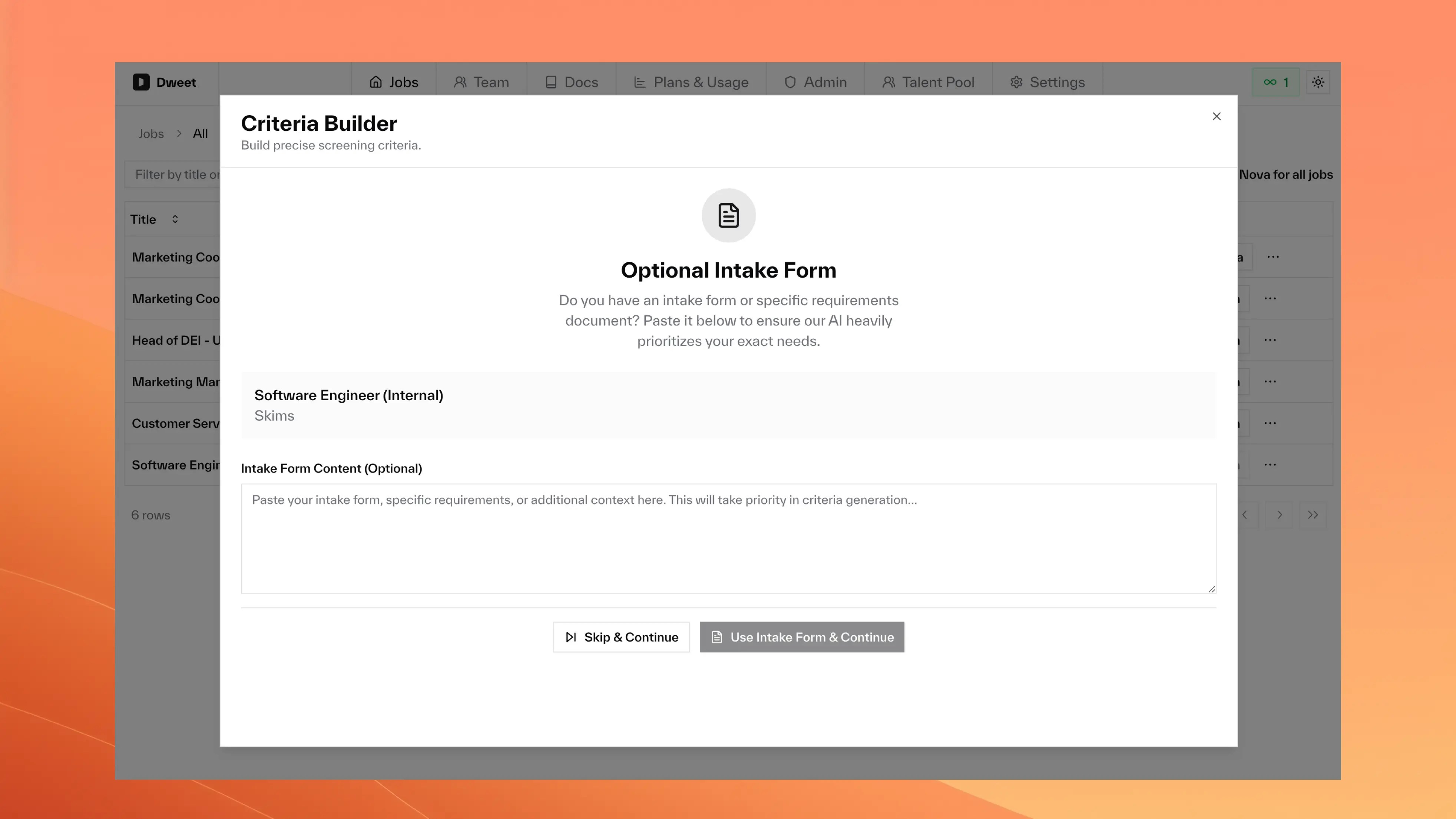
- Intake form requirements (highest priority when provided)
- Target companies (influences criteria generation when specified)
- Resume/CV (main scoring input)
- Job description (context and terminology)
- Your configured criteria (the rules Nova follows)
Adding Custom Requirements
You can add requirements that live outside your job description: deal-breakers, cultural fit needs, or specific team requirements that aren’t in the JD.What Counts as Additional Requirements?
- Meeting Notes
- Checklists
- Cultural Fit
- Bullet-point notes from kickoff meetings
- Stakeholder feedback from hiring discussions
- Last-minute requirements from leadership
- Technical specifications not in job description
How to Use the Intake Form
Specify Target Companies (Optional)List companies whose talent pools align with your hiring goals in the Target Companies field. Nova will research these organizations to inform criteria generation.
Choose Your PathClick Continue to proceed with your inputs, or Skip & Continue if no extra context needed.
How Nova Drafts Your Criteria
Nova uses three specialized AI agents working together:- Best Practices
- Brand Analysis
- Synthesis
Best-Practices Researcher
- Scans trusted HR sources for similar roles
- Reviews recent job ads in your industry
- Surfaces tried-and-tested requirements
Editing Your Criteria
Making Changes
Edit Individual CriteriaHover any criterion and click Edit to modify text or change Required ↔ Nice-to-have.
Review Recruiter GuidanceClick Show recruiter guidance to see verification tips, equivalents, and decision guidelines.
Re-scoring Existing Candidates
If you’ve already processed candidates and have access to re-scoring, simply hit Re-score to refresh all existing scores with your updated criteria.
Criteria Library
Build a company-wide library of reusable screening criteria. Save criteria once, then add them to any job with a few clicks. No more copy-pasting between jobs or rewriting the same requirements.Getting Started
What to Save in Your Library
The best criteria to save are company-wide standards that apply across multiple roles:Tenure & Stability
Tenure & Stability
Requirements around job tenure that reflect your company’s preferences:“Candidate has demonstrated job stability with at least 2+ years average tenure at previous roles, or has clear justification for shorter stints (e.g., startup acquisitions, contract roles)”
Startup Experience
Startup Experience
For companies that value entrepreneurial backgrounds:“Candidate has worked at an early-stage startup (Series A or earlier) or demonstrated entrepreneurial experience building products from 0-to-1”
Communication Skills
Communication Skills
Written and verbal communication standards:“Candidate demonstrates strong written communication skills as evidenced by well-structured resume, clear cover letter, or professional portfolio”
Remote Work
Remote Work
For distributed teams:“Candidate has prior experience working in a distributed/remote team environment with asynchronous communication”
Culture Fit
Culture Fit
Values alignment criteria:“Candidate demonstrates alignment with company values through examples of collaboration, ownership, and continuous learning in their experience”
Managing the Library
- Remove from library: Click the star icon again on a saved criterion to remove it from the library (the criterion remains on the current job)
- Delete from library dialog: Open the library and click the trash icon to remove a criterion entirely
- Shared with team: All team members in your company share the same library. Criteria saved by one person are available to everyone
Optimization Best Practices
- Common Issues
- Tuning Guide
- Diversity Considerations
| Symptom | Probable Cause | Fix |
|---|---|---|
| Too many 9-10 scores | Criteria too loose | Tighten experience ranges, add specific requirements |
| Great candidate scored 4-5 | Criteria too strict | Check if they actually meet criteria, then broaden if needed |
| Everyone gets 4-6 scores | Too many Required flags | Convert less-critical rules to Nice-to-have |
Scoring Input Sources
Nova reads everything in the ATS application:Primary Sources
Primary Sources
Additional Context
Additional Context
- Cover letters and portfolios
- Custom application questions and responses
- LinkedIn URLs (if no resume attached)
- Any other documents in the application
What's NOT Included
What's NOT Included
- Hidden weightings or black-box factors
- Requirements not in criteria, intake form, or job description
- Arbitrary AI preferences or biases
- Historical hiring patterns (unless explicitly enabled)
Frequently Asked Questions
Can I weight criteria differently?
Can I weight criteria differently?
Nova doesn’t support manual weighting by design. Traditional weighted systems are hard to maintain and often introduce bias. Instead, Nova uses advanced AI to intelligently balance all criteria together.
How do I know if my criteria are working?
How do I know if my criteria are working?
Monitor the first 20-30 scores. If results don’t match your expectations, adjust criteria specificity and required vs nice-to-have designations.
What if I need to change criteria mid-search?
What if I need to change criteria mid-search?
Edit or delete outdated criteria anytime. If re-scoring is available, Nova updates all existing scores in seconds to reflect your changes.
How specific should criteria be?
How specific should criteria be?
Specific enough to be resume-verifiable but broad enough to avoid excluding great candidates with adjacent experience. Include equivalents and alternative paths.